@ikenga/pkg-tasks · v0.8.3 · com.ikenga.tasks · Apache-2.0
A task manager that stays where work happens.
Local-first. No account. No round-trip to a server. Your task data lives in the same local SQLite database the rest of Ikenga uses — on your machine, always one click away.
Every project turns into a scattered heap of tasks — some in a GitHub board, some in a note, some in a chat thread you'll never scroll back to. Switching contexts to check them means leaving the place where work actually happens. Tasks is a mini-app that installs into the Ikenga shell and stays there. Status changes write immediately to the local database. No save button.
ikenga add @ikenga/pkg-tasks Requires the Ikenga shell. Once installed, Tasks appears in the sidebar under the ops section. View selection persists between sessions.
The List view — see everything at once
Tasks groups your work automatically: Overdue, Today, This week, Later, and Auto-closed. A filter bar lets you narrow by search text, status, owner, or category.
Click any row to open a detail pane alongside: status, progress %, tags, source chips, subtasks, and the blocking task. Status changes write immediately to the local database — no save button, no round-trip to a server.
The Agenda view — today as a time-rail
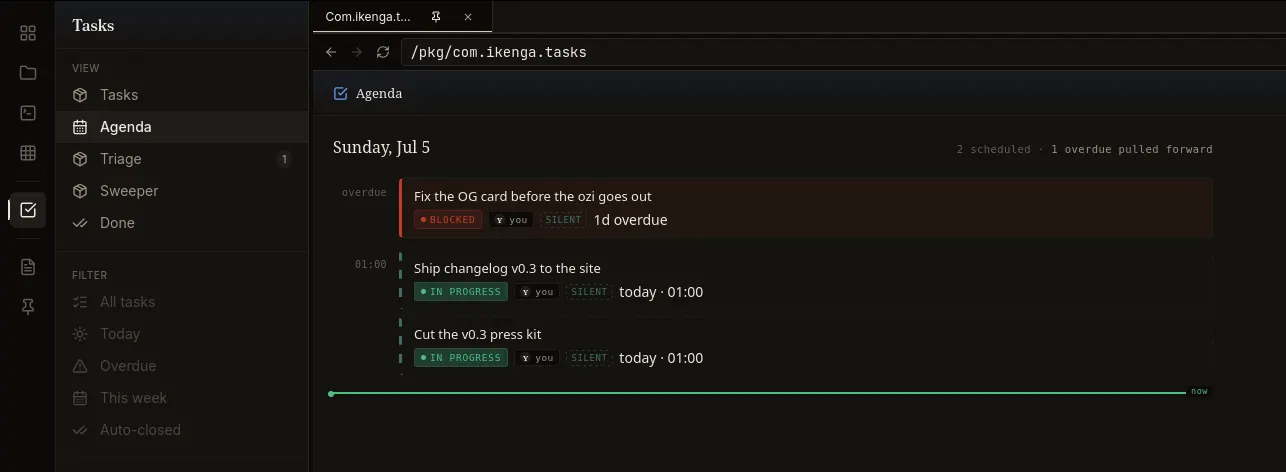
Agenda projects the current list onto an hourly rail for today. A live "now" line moves with the clock. Overdue tasks from prior days pull forward into a bucket at the top so nothing falls out of sight.
The Triage view — backlog health at a glance
Triage surfaces four health counts — Overdue, Stale (>7 days), Unassigned, and Blocked — with sample rows for each bucket and an overall backlog health grade. Use it at the start of a session to decide what to touch before diving in.
The Sweeper view — the auto-close review queue
Sweeper shows the tasks the system has marked as candidates for auto-close — work whose side-effect has likely been observed (reply sent, post published, etc.) but that hasn't been formally closed yet. Reviewing here takes seconds and keeps your list honest.
The Done view — closed task record
Done is a plain log of everything that has been closed. A record on your machine that doesn't disappear.
Creating a task
New tasks are dispatched as a message into your active Claude Code session — Claude creates the task on its privileged write path. The "New task" button is intentionally disabled when Tasks runs in standalone preview (no agent session to dispatch to). The agent is the write path so the record stays consistent.
Fork it in one step
Tasks is a no-build pkg — the source you read is the source that runs. Copy and change it:
git clone https://github.com/Royalti-io/ikenga-pkgs && cp -r ikenga-pkgs/packages/apps/tasks ~/my-tasks
# edit ~/my-tasks/manifest.json (change the id), adjust dist/features/* as needed
ikenga add ~/my-tasks
No tsc, no Vite, no bundler. Edits to files in
dist/ take effect on next reload.
Works with / requires
| Requires | Ikenga shell (any v0.1.x+) |
|---|---|
| Data store | Local SQLite (ikenga.local — the shell's shared database) |
| Tables used | tasks |
| Network | https://esm.sh only (React, TanStack Query, htm loaded at
runtime) — no outbound calls to any backend
|
| Works with | Claude Code (agent write path); any session active in the shell |
| Does not require | A cloud account, a Supabase project, or any external service |
See also
- Package catalog — all published Ikenga packages
- Build a pkg — author your own in the same no-build pattern
- mcp-iyke — let Claude Code drive the shell that Tasks runs in